Scanner hardware
Ricoh fi-8170 for Scanning Sports Cards
The real settings from a store that runs on one.
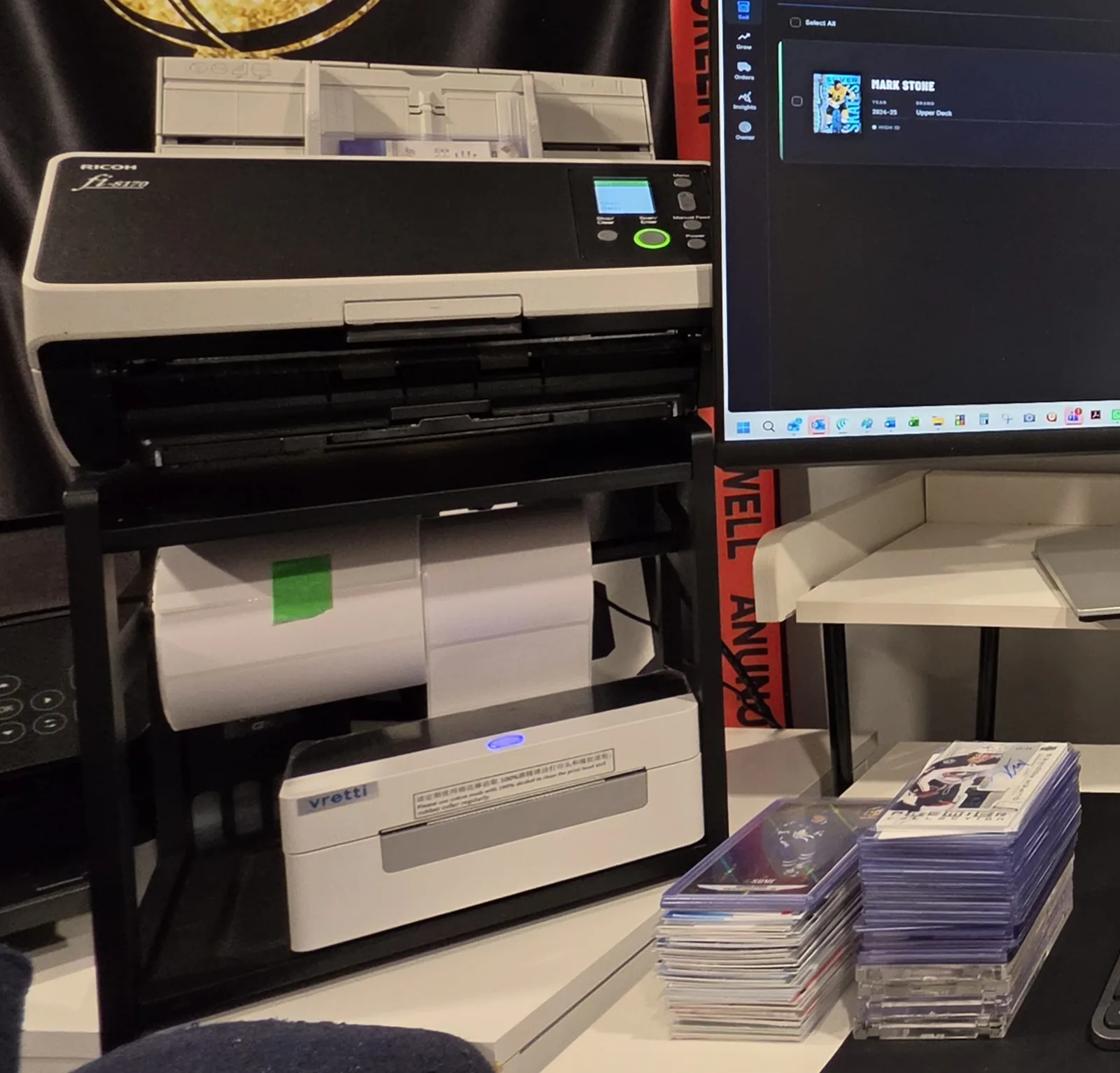
The Ricoh fi-8170 scans sports cards well: sleeved cards stack in its feeder, it captures front and back in one pass, and at 600 dpi the card number on the back is legible. As of September 2026 it is the scanner behind Loubs Cards, an eBay hockey store with 1,500+ live listings, and this page is that scanner's exact PaperStream profile, read from the driver rather than remembered. It costs $1,070.99 at ScannerOne as of September 5, 2026, it does not take graded slabs, and WaxEngine also accepts phone photos of raw hockey, baseball and football cards if the pile is small.
Written by Christopher Loubert, who owns the Ricoh fi-8170 on this page and built WaxEngine around the images it produces. Time-sensitive figures are dated inline and hardware specifications are attributed.
The profile
What settings scan sports cards on a Ricoh fi-8170?
The PaperStream IP profile Loubs Cards scans every card with is 600 dpi, 24-bit colour, duplex, automatic border detection with deskew off, auto-rotate plus a 180 degree turn, ultrasonic multifeed detection on, and PNG output. The table is that profile as read from the driver on September 5, 2026, after 6,843 scanned pages on this counter. Build it once in PaperStream IP, save it under a name, and point a PaperStream Capture job at it.
| Setting | Value | Why |
|---|---|---|
| Resolution | 600 dpi | Sensor limit. Card numbers and serial numbering on the back stay legible. |
| Colour mode | 24-bit colour, auto-colour detection off | Every side comes out in colour, no per-page guessing. |
| Sides | Duplex | Front and back in one pass. The back carries the card number. |
| Paper source | Automatic document feeder | Sleeved cards stack in the hopper. |
| Cropping | Automatic border detection on, paper size undefined | The scanner crops to the card, so the penny sleeves and top loaders in use at Loubs Cards come out as one image each. |
| Deskew | Off | Off in this profile; border detection does the crop and cards feed straight. |
| Rotation | Auto-rotate on, plus a fixed 180 degree turn | Matches how the cards are loaded in this feeder; the turn puts them upright. |
| Blank pages | Auto-discard on | Usually nothing to discard on a card; harmless to leave on. |
| Multifeed detection | Ultrasonic overlap detection on | Catches two sleeved cards stuck together before they become one image. |
| Brightness and contrast | 0 and 0, auto-brightness on | Untouched; identification works from the raw scan. |
| Output | PNG, one file per side, named image plus a counter | Lossless. Files are 4 to 6 MB each and about 1,700 by 2,300 pixels for a sleeved card. |
Cards go into the Ricoh fi-8170 feeder in penny sleeves at Loubs Cards. Top-loaded cards go through the same Ricoh fi-8170 there with multifeed detection on, which is first-hand practice outside Ricoh's plastic-card specification of 1.4 mm, not Ricoh guidance. The Capture job writes each side as a PNG into one folder, and WaxEngine watches that folder from Chrome or Edge, pairing the two files the duplex pass writes as front and back.
The hardware
What are the Ricoh fi-8170 specs that matter for cards?
Four specifications matter for cards: 600 dpi optical resolution, a 1.4 mm plastic-card thickness rating, a 48 by 50 mm minimum document size, and ultrasonic multifeed detection. The rest of the datasheet is office-scanner detail. Figures below are from the Ricoh fi-8170 datasheet published by PFU, checked September 5, 2026.
| Spec | Ricoh fi-8170 | For cards |
|---|---|---|
| Optical resolution | 600 dpi | Scan at 600 dpi; it is the sensor limit |
| Rated speed | 70 ppm simplex, 140 ipm duplex, at 200 or 300 dpi | Ricoh publishes no 600 dpi figure; a 600 dpi batch runs below this rating |
| Feeder capacity | 100 sheets of 80 g/m2 paper | Sleeved cards are thicker, so load fewer |
| Minimum document | 48 x 50 mm | A standard card is 63.5 x 88.9 mm, well inside |
| Plastic card thickness | 1.4 mm or less | A 20-point card is about 0.5 mm; top loaders are not covered by this rating |
| Manual feed mode | Booklets up to 7 mm | Passports, not graded slabs |
| Multifeed detection | Ultrasonic overlap sensor | Leave it on; two stuck sleeves become one bad image |
| Interfaces | USB 3.2 Gen 1 and Gigabit Ethernet | USB is fine; Ethernet lets one scanner serve two desks |
| Daily duty cycle | 10,000 pages | Compare with your own daily volume |
| Weight | 4 kg (8.8 lb) | Sits on a shelf next to a label printer |
| Price | $1,070.99 at ScannerOne, September 5, 2026; $1,445.00 list | The main consideration for a small seller |
The alternatives
Ricoh fi-8170 or a phone, a flatbed, or the old fi-7160?
A phone camera suits a pile of a few hundred cards, a flatbed suits graded slabs, and the Ricoh fi-8170 suits a backlog in the thousands. The fi-7160 it replaced does the same job at a lower rated speed and is discontinued, so it is bought used. Where the fi-8170 loses is price and slabs, and both are listed first.
| Option | Wins when | Loses when |
|---|---|---|
| Phone camera | Fewer than a few hundred cards; no extra purchase if you own one; photographs slabs and thick cards; WaxEngine accepts phone photos of raw hockey, baseball and football cards | Thousands of cards, one at a time, front and back, under a lamp |
| Flatbed scanner | Graded slabs, thick relics, anything rigid | One lid lift per side per card |
| Fujitsu fi-7160 (used) | Same 600 dpi optical, 80-sheet feeder, same PaperStream IP driver; discontinued, so bought used | 60 ppm rating at 200 or 300 dpi, USB only, no new-unit warranty |
| Ricoh fi-8170 | Thousands of sleeved cards, duplex in one pass, straight into a watched folder | $1,070.99 as of September 5, 2026; no slabs; top loaders are outside the plastic-card rating |
The Fujitsu fi-7160 drew about 7,500 US searches a month across its spellings in September 2026 (Semrush), more than the fi-8170, and Card Dealer Pro's hardware pages still recommended it when checked on September 4, 2026. PFU discontinued the fi-7160 and announced the fi-8170 as its successor on February 15, 2022; the fi-7160 page covers what to check before buying one used. The sports card scanner page covers the phone-versus-scanner decision in more depth, and how to sell sports cards on eBay shows where scanning sits in the whole workflow. The best card scanners guide compares the fi-8170 with the fi-8190, fi-8150, fi-7160 and ScanSnap iX1600 on the makers' figures.
After the scan
What turns a fi-8170 scan into an eBay listing?
A scan is two PNG files in a folder. WaxEngine watches that folder from Chrome or Edge on a desktop, pairs each front with its back in the order the fi-8170 writes them, identifies the raw hockey, baseball or football card from the images, prices it from real eBay sold comps, writes a title up to eBay's 80-character limit with item specifics, and queues it for review. As of September 2026 a card goes from feeder to a publish-ready listing in about 30 seconds of software time, and cards keep queuing while the scanner is still running.
- No WaxEngine-specific driver or plug-in. A duplex scanner that writes each side as a separate JPG, PNG or WebP file, front then back, into a folder works the same way for raw hockey, baseball and football cards; the fi-8170 is on this page because it is the one on the desk, not because it is required. The watched-folder details are on the sports card scanner page.
- What it does not do. Graded slabs are not priced. Pokemon is scanned and reviewed only. Basketball is on the roadmap. As of September 2026 identification, pricing, listing and relisting cover raw hockey, baseball and football cards.
- The scanner is the commodity. eBay's own app identifies a card for free from a phone photo. The part that takes the time is everything after identification: the price, the title, the item specifics, and working the listing once it is live.
Common questions.
Does the Ricoh fi-8170 scan sports cards?
Can the fi-8170 scan cards in penny sleeves or top loaders?
What dpi should I scan sports cards at?
Is the fi-8170 worth buying over the fi-7160?
Does the fi-8170 scan graded slabs?
What does the Ricoh fi-8170 cost?
Ricoh's own specifications are in the fi-8170 datasheet and the successor announcement in the PFU press release of February 15, 2022.
Scanner running? Point WaxEngine at the folder.
Sleeved raw hockey, baseball or football cards in the feeder, PNGs in a folder, priced and titled listings in the review queue. 14 days free, no credit card.
Start your 14-day free trialNo credit card required. The first 10 subscribers lock in $19.95/mo for life.
Thanks for the honest answer. It genuinely helps.